
Use case
Quick Questions & Polls for Personal Use
Decide dinner plans, pick a date, settle a debate — ask in a chat, share the link, watch the answers roll in.
Free plan. No credit card required.
Updated 20 October 2026
Why Answe for Personal Use
Ready in 10 seconds
Type a question, add options, share the link.
Works on phones
Mobile-first design — no app to install.
No signup for voters
Friends click and answer.
Completely free
Personal use is free, forever.
How it works
Personal Use — Polls, Surveys, and Quick Questions
Introduction
Answe isn't just for businesses. Use it for personal projects — run polls, create surveys, collect RSVPs, or ask friends and followers quick questions. Share your link — or optionally embed it on your blog.
How It Works
Quick Polls
Create a simple poll in minutes:
- Write your question: "What should we have for dinner?"
- Add options: "Pizza", "Sushi", "Tacos", "Cook at home"
- Share the link
- See results in your inbox
Surveys
Build multi-step surveys:
- Ask a series of questions
- Each answer leads to the next question
- Collect responses with optional contact info
- View all responses in one place
Event RSVPs
Create an RSVP widget:
- "Are you coming to the party?"
- "Yes" → Collect name and dietary preferences
- "No" → "Sorry to miss you!" message
- "Maybe" → "We'll save a spot, let us know!"
Blog Engagement
Embed widgets on your blog to:
- Ask readers their opinion
- Collect topic suggestions
- Run reader polls
- Get feedback on posts
Real-World Scenarios
Birthday party: Share a link with friends to collect RSVPs, dietary restrictions, and song requests.
Blog: Embed a poll in your latest post asking readers which topic to cover next.
Group decision: "Where should we go for the team outing?" with venue options and a form for date preferences.
Key Benefits
- Free to start — No cost for basic use
- Shareable — Send a link to anyone
- Embeddable — Place on any blog or website
- Interactive — More engaging than Google Forms
- Mobile-friendly — Works on any device
- Real-time results — See responses as they come in
Getting Started
- Start at answe.com/start — you can try a working flow before creating an account — then claim your link
- Write your question and add options in the builder (or click + Add a flow on your page)
- Share the link — or optionally embed it on your site
- Collect responses in your inbox
Related
- Creating Your First Question — Build your first widget
- Forms & Surveys — Form field types
- Widgets — Widget embedding options
- Teams & Clubs — Group planning
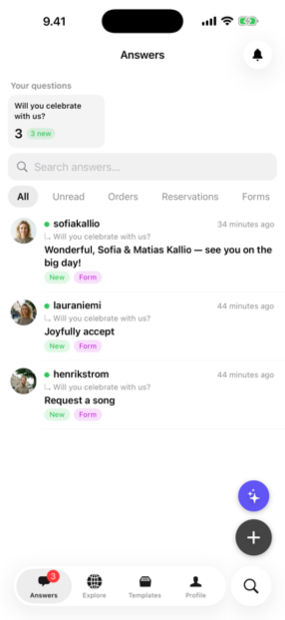
Manage it all on the go
Every answer, booking and lead lands in the Answe app — reply from your phone before the competition even checks email.
Trusted by businesses in Helsinki and beyond


Every plan takes bookings. Pay for volume, not features.
Prices as of 20 October 2026
See all plansFrequently asked questions
Is there an app?
Answe works in any browser; no app needed.
How long are questions kept?
As long as your account is active.