
Use case
Lead Capture Widgets That Convert
Turn website visitors into qualified leads with conversational forms and AI chat — every lead arrives as a conversation you can pick up and continue, not a row in a spreadsheet.
Free plan. No credit card required.
Updated 20 October 2026
Why Answe for Lead Generation
Interactive, not intrusive
Ask questions instead of showing a form wall.
AI qualification
Add an AI-powered step with your instructions — it asks the right follow-ups so your sales team gets context.
Route to your CRM
Webhooks and integrations push leads where they belong.
Built-in analytics
See which pages and widgets drive the most leads.
How it works
Lead Generation — Convert Website Visitors into Customers
Introduction
Most website visitors leave without taking action. Answe widgets engage visitors with interactive questions, qualify them through conversation flows, and capture their contact information — turning passive browsers into qualified leads.
How It Works
Engagement-First Approach
Instead of a static contact form buried on a page, Answe widgets start a conversation:
"What brings you to our site today?"
  ├── "Looking for pricing"     → Show plans → Capture email for quote
  ├── "Evaluating solutions"    → AI answers questions → Book a demo
  ├── "Existing customer"       → Route to support
  └── "Just browsing"           → Show key features → Offer newsletter
Lead Qualification
Use multi-step flows to qualify leads:
- Ask about their needs
- Ask about company size or budget
- Collect contact information
- Route to the appropriate team or next step
Contact Capture
Conversational forms feel natural and get higher completion rates:
- Name and email after providing value (not upfront)
- Phone number only when relevant
- Company and role for B2B leads
- Custom fields for industry-specific qualification
AI-Powered Qualification
AI agents can:
- Answer product questions in real-time
- Understand visitor intent from their messages
- Recommend the right product or service
- Hand off to your sales team when ready
Real-World Scenarios
SaaS company: Widget on the pricing page asks "What's your team size?" and "What features matter most?" then shows the right plan and captures email for a trial invite.
Agency: Portfolio page widget asks "What type of project?" and "What's your timeline?" to qualify leads before showing the contact form.
Real estate: Property listing widget asks about budget, location preferences, and timeline, then captures contact info for matching listings.
Education: Course page widget asks about current skill level and goals, then recommends the right program and captures enrollment info.
Key Benefits
- Higher conversion — Interactive widgets convert better than static forms
- Qualification — Filter serious leads from casual browsers
- Personalization — Show different content based on visitor answers
- 24/7 capture — AI qualifies leads outside business hours
- Context — Every lead comes with their conversation history
- Analytics — See conversion rates, drop-off points, and revenue
- No developer needed — Set up and customize without code
Lead Capture Best Practices
- Provide value first — Answer their question before asking for contact info
- Ask progressively — Start easy, ask sensitive info later
- Keep it short — 3-5 steps maximum
- Be transparent — Tell them what happens after they submit
- Follow up fast — Leads in your inbox are ready to hear from you
Getting Started
- Go to answe.com/start, choose Get a quote and describe your business — test the flow, then claim your link
- Build a 3-5 step qualification flow
- Add contact capture forms
- Share your link — bio, WhatsApp replies, email signature, or a QR code
- Optional: embed the flow on your most visited pages, matched to visitor intent on each
- Monitor leads on the Leads page — filter, search, and track status
Related
- Leads & CRM — View and manage all captured leads
- Forms & Surveys — Form field types for lead capture
- AI Agents — AI-powered qualification
- Analytics & Insights — Conversion tracking
- Widgets — Widget types for different page positions
- Chat Inbox — Manage and respond to leads
Manage it all on the go
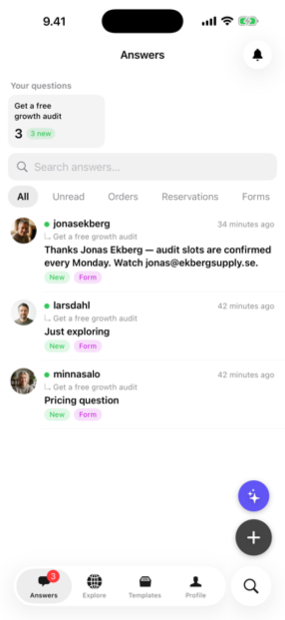
Every answer, booking and lead lands in the Answe app — reply from your phone before the competition even checks email.
Trusted by businesses in Helsinki and beyond

Every plan takes bookings. Pay for volume, not features.
Prices as of 20 October 2026
See all plansFrequently asked questions
What CRMs can I send leads to?
Any CRM that accepts webhooks. Native integrations cover the common ones.
Can I A/B test widgets?
Yes — duplicate a widget and compare conversion in analytics.
Is AI chat included?
Yes on paid plans; the free tier uses rule-based flows.
Templates for lead generation
Working flows you can try and copy in one click.
Bookings · business
Marketing agency consultation booking form
Take real consultation bookings for new website and campaign from one link — the slot is reserved the moment the client confirms, and it lands in your inbox.
 Sample: Studio Nordvind
Enquiries · business
Marketing agency contact form
A contact form that answers: the common question instantly, a call back at the right time, and everything else as a chat you can continue.
 Sample: Ember Creative
Client intake · business
Marketing agency project brief form
Collect the brief, the files and the budget before the first call — one link, one chat, nothing to chase.
 Sample: Toimisto Kipinä
Quote requests · business
Marketing agency quote request widget
Turn "how much would it cost?" into a complete request — description, photos, timing and budget — before you type a single reply.
 Sample: Brightside Agency
Try Answe for Lead Generation
Free plan, no credit card. Set up your first widget in minutes.
Start free