
Use case
Quick Questions & Polls for Personal Use
Decide dinner plans, pick a date, settle a debate — ask in a chat, share the link, watch the answers roll in.
Free plan. No credit card required.
Why Answe for Personal Use
Ready in 10 seconds
Type a question, add options, share the link.
Works on phones
Mobile-first design — no app to install.
No signup for voters
Friends click and answer.
Completely free
Personal use is free, forever.
How it works
Personal Use — Polls, Surveys, and Quick Questions
Introduction
Answe isn't just for businesses. Use it for personal projects — run polls, create surveys, collect RSVPs, or ask friends and followers quick questions. Share a link or embed on your blog.
How It Works
Quick Polls
Create a simple poll in minutes:
- Write your question: "What should we have for dinner?"
- Add options: "Pizza", "Sushi", "Tacos", "Cook at home"
- Share the link
- See results in your inbox
Surveys
Build multi-step surveys:
- Ask a series of questions
- Each answer leads to the next question
- Collect responses with optional contact info
- View all responses in one place
Event RSVPs
Create an RSVP widget:
- "Are you coming to the party?"
- "Yes" → Collect name and dietary preferences
- "No" → "Sorry to miss you!" message
- "Maybe" → "We'll save a spot, let us know!"
Blog Engagement
Embed widgets on your blog to:
- Ask readers their opinion
- Collect topic suggestions
- Run reader polls
- Get feedback on posts
Real-World Scenarios
Birthday party: Share a link with friends to collect RSVPs, dietary restrictions, and song requests.
Blog: Embed a poll in your latest post asking readers which topic to cover next.
Group decision: "Where should we go for the team outing?" with venue options and a form for date preferences.
Key Benefits
- Free to start — No cost for basic use
- Shareable — Send a link to anyone
- Embeddable — Place on any blog or website
- Interactive — More engaging than Google Forms
- Mobile-friendly — Works on any device
- Real-time results — See responses as they come in
Getting Started
- Create an account
- Write your question and add options
- Share the link or embed on your site
- Collect responses
Related
- Creating Your First Question — Build your first widget
- Forms & Surveys — Form field types
- Widgets — Widget embedding options
- Teams & Clubs — Group planning
Manage it all on the go
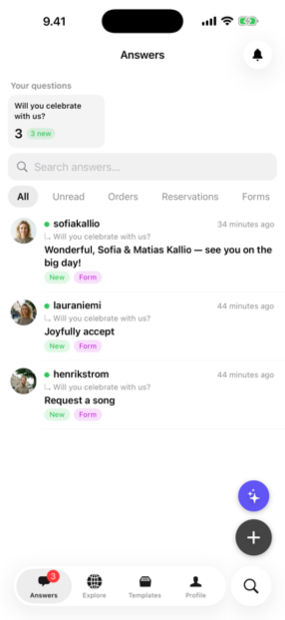
Every answer, booking and lead lands in the Answe app — reply from your phone before the competition even checks email.
Start free. Upgrade when you need to.
Frequently asked questions
Is there an app?
Answe works in any browser; no app needed.
How long are questions kept?
As long as your account is active.

Questions? Ask the founder.
I'm Timo, and I read every message myself. Want a demo, wondering if Answe fits your business, or just have a question — leave a message below or email me at [email protected].
Message Timo